
To add a web font to the Web Font Manager, you'll need a link to a CSS file with the @font-face rule (not a direct link to the font file itself).
Example: https://fonts.googleapis.com/css2?family=Palette+Mosaic
There are many places to get web fonts — in fact, pretty much every font website and foundry offers web fonts as an option when you purchase. Just be aware that it's important to get a license that covers emails, not just websites. This isn't always spelled out explicitly, so it's worth reaching out to the company directly to check whether any of their licenses cover emails sent from an email service.
If your company has its own custom font, the license probably covers a range of uses, but we'd still recommend double-checking that emails are included. Whoever manages your vendor contracts, such as your legal counsel, would likely know.
Google Fonts is also worth mentioning here: it offers a large library of free, open-source fonts available for anyone to use, and even hosts them for you.
Getting the Font CSS URL from a service
The easiest method is to get it from a font licensing company such as Google Fonts, Adobe Fonts or MyFonts.com
Getting a CSS link using Google Fonts (Free!)
Google fonts are a great resource for free, open source fonts. Since they are open source, you can legally use them in a commercial setting.
- Go to the Google fonts website https://fonts.google.com/
- Browse fonts using their search filters. Keep in mind that when you search the Google Fonts database, it will also show links to non-open-source commercial fonts. There's no way to filter these out, but you'll be able to spot them right away, since they display an icon pointing to an external site (see screenshot below).
- Once you have decided on the font you want to use, click on the button + Select this style
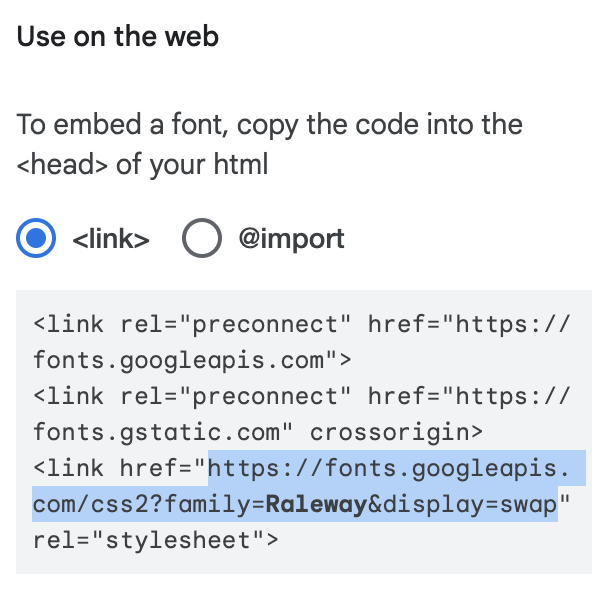
- In the right-hand panel, look for the section called Use on the web and copy the URL.
- That's your Font CSS URL - you can use it directly in the Web Font Manager.
Getting a CSS link using Adobe (usually free)
Adobe offers fonts as part of its general cloud licensing plan, so if you or someone at your company has an Adobe Photoshop Cloud subscription, it likely comes with some font licensing included.
- Go to the adobe font website to find your font
- Log into your Adobe Cloud account
- Click into the Font Family page
- Find the font style you want and click the </> icon
- Create a new Project
- Click Create
- Copy the css url which starts with https:// and ends with .css
Hosted by your own company's IT team
Another option is to have the file hosted on your company's own servers. This requires a bit more setup, but if the font you want isn't available through a font licensing company, it'll be your only option.
To get this link, you'll need to reach out to a technical resource at your company. Ask them to provide a link to a CSS file with the @font-face rule. It must be hosted in HTTPS, and CORS Policy must be enabled in the host to deliver the font files. See example here.
Alternatively, you could reach out to your web developer or whoever manages your company website's development for the link — they'll also be able to give you the correct font stack.